
Today, we’re looking under the hood of a bespoke Floor Waste Object created for an architectural practice of 60+ Archicad users. It might look simple on the surface, but this single object replaced a messy combination of multiple objects, 2D lines and text for a big team of Architects.
The Brief: One Object to Rule Them All
The client was facing a classic documentation headache: 50+ staff members were all using different methods to represent floor wastes. They needed a single, “smart” object that could:

Switch between multiple shapes and sizes.
Adapt its graphics automatically based on the drawing type.
Provide total control over pens, weights, and fills in both 2D and 3D.
Include a built-in, intelligent label for rapid-fire documentation.
The Solution: Logic-Driven Documentation
The goal wasn’t just to make a 3D model; it was to build a flexible tool that handles the “busy work” of documentation production.
1. Geometric Flexibility
The object provides three core shapes—Circle, Square, and Rectangle—with a curated set of dimensions. We stripped away the “dimension bloat” found in many objects, leaving only the controls the architects actually need to meet their office standards.
2. The Power of Model View Options (MVO)
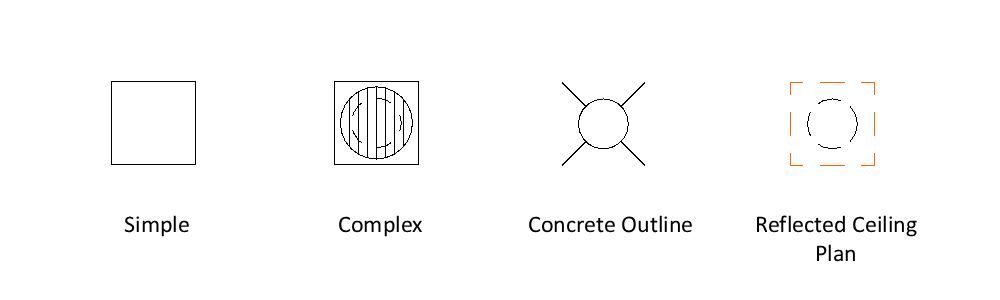
This is where the magic happens. Instead of manually changing every drain in a project, users can set the display globally. One click transforms the entire project across:
Simplified (For quick schematics)
Detailed (For construction docs)
Concrete Outline (For structural coordination)
Reflected Ceiling Plan (For ceiling/service coordination)
3. True 3D Coordination & SEO
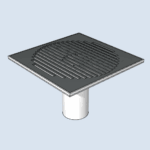
This isn’t just a surface-level symbol. The object models both the visible capping and the drain pipe beneath it. Because the pipe is a true 3D volume, it can be used with Solid Element Operations (SEO) to penetrate slabs to a given depth. This gives you perfectly accurate sections and 3D coordination without additional “carving” or 2D masking.
4. Total Graphical Command
Users can toggle the visibility of the capping and the drain separately in both 2D and 3D. While some pens are changed per specific model view, others are controlled across all view types balancing need and complexity.
5. The “Smarter” Label
Archicad’s built-in labels are great, but for high-volume tasks, efficiency is king. We built a custom label directly into the object. It’s moveable, rotatable, and can be toggled on or off per instance or via MVO. It’s simple, fast, and eliminates “label lag” – the need to place and modify a separate label.
What This Actually Means for the Office
This isn’t just about a drain; it’s about Standardization at Scale.
Zero Guesswork: 50+ staff now show floor wastes exactly the same way every time.
BIM Ready: No more 2D “patches.” This is a data-rich product ready for full scheduling.
Instant Updates: Need to change the look of 200 drains for a concrete setout? Change one MVO setting and you’re done.
The “Hidden” Bonuses
Because we coded this with the future in mind, the client received more than just one tool:
The MVO Foundation: We set up a custom Model View system that now serves as a “home” for all future bespoke objects developed for the firm.
The Macro Advantage: The built-in label was created as a Macro. This means for every future object we build for them, we can simply “plug in” this label with nominal additional code.
Code Recycling: The logic was so robust that the client immediately requested a Service Floor Box object, which we delivered in a short time by repurposing the floor waste’s core engine.
The Takeaway: Don’t settle for basic objects like sinks and chairs. Investing in high-functioning GDL tools is the best way to scale your office’s quality and efficiency.